|
|
|
Festive Greetings (22 December 2008)
- Happy Christmas everyone - here's a festive tree (thanks to a free clip-art site) with a link
to the latest Ubercode purchase page :)

- Also I have added 3 new articles to the Technical Support area. They cover:
- How to set up a timer control
- How to capture the output of a command line
program
- How to make a dialog window store its
settings
Update (15 December 2008)
- The Trial Pack had a problem with one of the templates, and as a result the File - New Program
command was not working. This has been fixed with a new update - go to downloads to get the new improved version.
- For those interested, the technical details are as follows. The Developer Environment's ini
file (ide.ini) has templates for [NewNonMainClass], [NewMainClass], [NewDialog], [FunctionBody],
[DataViewDialog] and [DatabaseDialog]. The [NewMainClass] and [NewDialog] templates are required
when creating a new program. As a result of the changes done to allow templates to be added for
Basic, part of the [NewMainClass] template was accidentally removed. This has now been fixed.
- All these templates will eventually be qualified by the language type, for example
[NewMainClass.cls], [NewMainClass.vba] etc. This will allow the Developer Environment to be usable
with Ubercode and with Basic.
Compiler Improvements (7 December 2008)
- It's now cold and wintery in Jersey so here is a picture of somewhere nice and sunny on the
other side of the world (Perth). I was lucky enough to go there for my holidays about a year ago:

- Apart from dreaming of sunshine, I have improved the Ubercode compiler so it runs a lot faster
(about twice as fast). This was done by improving the way the compiler sends information to the
developer environment when multiple classes are being compiled. Previously it was using multiple
FindWindowHandle() calls and cross-process message handling to update controls in a separate
process, but now there is a simplified message system.
- I delivered a talk on Ubercode Basic at the ESWC 2008 conference. This was well received and
thank you to everyone who helped by giving feedback. It will take a while to get the beta of the
Basic compiler ready - my current plan is for the long awaited v1.2 release early next year to
coincide with the first Basic beta. I'm finding it difficult to choose what to put in and what to
leave out.
- There's an improved Ubercode Trial Pack which includes the faster
compiler. Also I made a few minor tweaks to the support for Windows Vista. So download now and get
coding...
Go Vista! (2 November 2008)
- I recently upgraded my main desktop computer to a Dell with a dual core 2GHz processor and 2GB
of RAM, running Windows Vista Business Edition. Following all the gloomy talk about Vista I was
expecting a disaster. Instead Vista worked a treat, it's simple to use, runs fast and looks really
nice. I had no compatibility problems and I'm really impressed with all aspects of this computer.
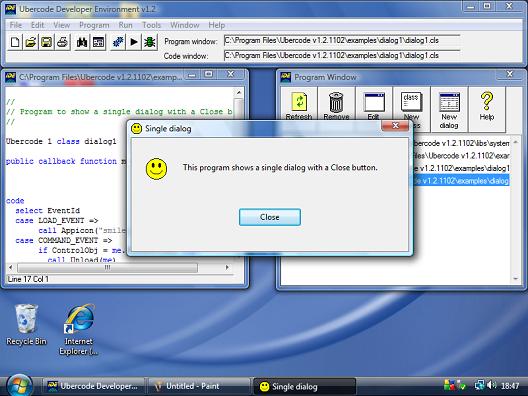
The new computer enabled me to port the latest Ubercode beta to Windows Vista, which was mostly
painless (just don't talk to me about default fonts under Windows!). Here's a picture of Ubercode
running on Vista:
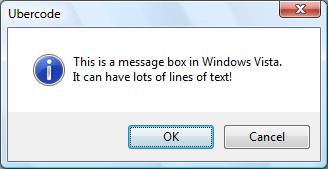
Another nice thing about Vista is the message boxes look better. Here is a normal style message
box:
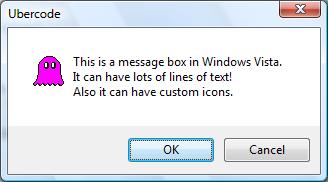
You can have message boxes with custom icons:
Also you can have a help button. Pressing the help button calls up a topic of your choice from a
help file:
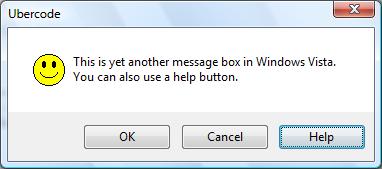
If you use a help file, it can be a CHM file (compiled HTML) or a plain HTML file. Vista doesn't
work with the old-stlye HLP files.
- Download the latest Ubercode Trial Pack and get coding under Vista
right away! Note that Ubercode still supports all earlier versions of Windows prior to Vista -
Ubercode is unique in allowing the exact same program to run on any version of Windows with the
correct look and feel in all cases.
- Other changes - the IIf function (Immediate If) has been added to Ubercode. The
observant will note that some recent language changes are to support Ubercode Basic without
affecting the core Ubercode product.
- Type system - I have made some changes and added type casting functions to the language. This
means if you declare a type Tsometype, the compiler automatically generates a casting
function with the same name. This makes it possible to convert other structurally compatible types
to values of Tsometype. This will eventually support generic array, list and table types
which will greatly simplify some tasks and will help Ubercode Basic. These changes should have no
effect on existing code.
- Minor changes - as a result of the auto generated casting functions, the maximum number of
symbols supported by the compiler has been increased to 3000.
- Finally do not forget the ESWC 2008 conference coming up in Berlin.
This promises to be one of the best conferences yet (OK I'm biased because I'm giving a talk!). See
you there...
Run Time Library Improvements (30 September 2008)
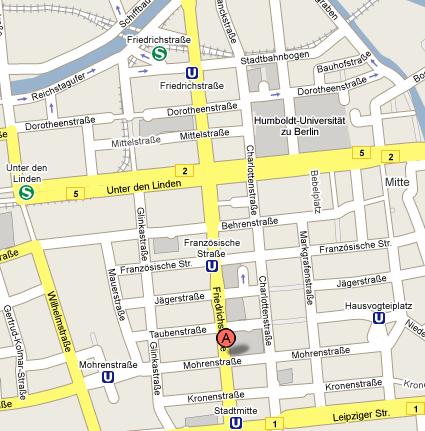
- Ubercode at European Software Conference 2008! I will be speaking again at the ESWC 2008 conference which is in Berlin. The
topic is on style versus substance in computer languages. So I hope you can make it.
- Here is a map showing where the conference is (thanks to Google maps):
- Language tidying up I have also been tidying up elements of the language in preparation
for the Ubercode Basic release. This consists of improved documentation, extra run time library
functions and the occasional change to existing functions. The main changes are as follows.
- Filelist is improved to work with readonly, hidden and system files, and the file
attribute constants have been introduced and renamed to begin with FILEATTR.
- Environ can get all the environment strings, in addition to getting the value of a
single environment variable.
- RegDeleteSetting, RegGetSetting, RegGetAllSettings, RegSaveSetting These registry
functions have been added and are in the documentation and the run time library.
- Errorhandler This function had a bug which allowed it to be called directly. This has
been fixed, since the error handler is not intended for calling from user code.
- New Download includes all the latest fixes and
improvements. If you have any requests please email me (link on the bottom of the page).
More Developer Environment Improvements (31 August 2008)
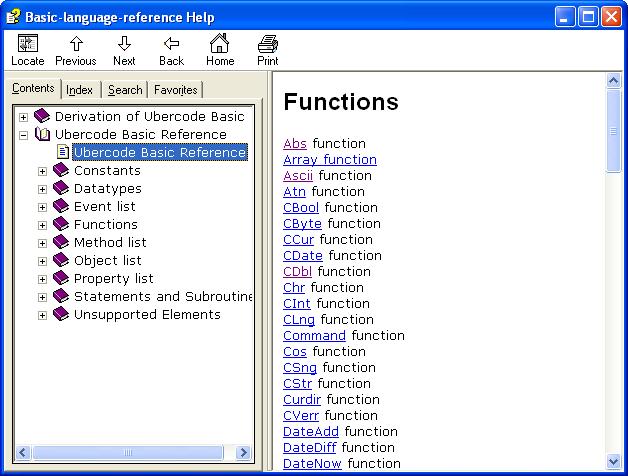
- I have started work on the Ubercode Basic help file (a version of Basic that is compatible with
Microsoft Visual Basic versions 5 and 6). When this is complete there will be a beta version of
Ubercode Basic ready for download. Here's a snapshot:
- Other changes...
- The Developer Environment now saves its position when it exits, and restores itself to this
position when it next starts. There is also safety code that detects if the position is off the
screen, and resets the position to the default if this happens.
- The Arguments constant has been changed into the Arguments function for
consistency (it was the only auto-declared constant in the run time library). Any code using
Arguments should append round brackets to make it call the function.
- There is a new Ubercode download available including these fixes
and the latest changes.
False positives (31 July 2008)
Ubercode does RS-232 (15 June 2008)
- The main development this month is support for RS-232 (Serial Communications). This connects a
computer to electrical devices such as PLCs (Programmable Logic Controllers), test and measurement
equipment. This month's project is to get serial communications working over an RS-232 cable. To
make things easier I'm using two computers and connecting their serial ports via the cable, so you
don't need any special equipment. The latest Ubercode download includes a serial comms program for testing the link.
- The first step is to make or buy a serial cable:
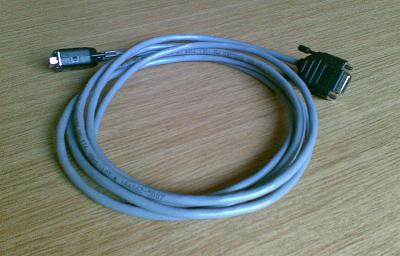
Technically speaking this is a Null Modem Cable. The cable crosses over the transmit and
receive wires internally, so everything transmitted from the first computer is sent to the receive
line on the second computer and vice versa.
- If you want to buy a cable you will need one that plugs into the serial ports on the back of
the two computers. In most cases these are 9-pin connectors so you need a null modem cable with
DB-9 sockets (female connectors) on both ends.
- If you want to make up a cable you need DB-9 sockets, shells, and 4 core serial cable,
preferably screened. You can use telecoms cable with two or more pairs but ideally the wires should
be stranded so the cable is flexible. Here are the pinouts of the null modem cable:
  DB9 connector on DTE     DB9 connector on DCE
  --------------------     --------------------
      2 (RxD) <--------------> 3 (TxD)
      3 (TxD) <--------------> 2 (RxD)
      7 (RTS) <--------------> 8 (CTS)
      8 (CTS) <--------------> 7 (RTS)
      5 (GND) <--------------> 5 (GND)
- DB9 This is the 9-pin socketed (female) serial connector which plugs into the back of
each computer. Serial ports on a PC are normally 9-pin (male) connector on the back.
DTE Data Terminal Equipment. This is comms-speak for the computer that runs the
communications with the connected device. In our case the DTE is the first computer.
DCE Data Communications Equipment. This is the connected device and in our case is the
second computer.
RxD The received data line. As you can see the receive line of each connector is joined to
the transmit line on the other end. This connection is essential to make serial comms work.
TxD The transmit data line, sends data to the other end to be received.
RTS Ready to send, this is set by the first computer (DTE) when it is ready to receive data.
The DCE detects this signal and starts transmitting.
CTS Clear to send, this is set by the second computer (DCE) when it is ready to receive data
from the DTE. The DTE detects this signal and starts transmitting. Normally RTS and CTS are handled
automatically so you don't need to worry about these.
GND Ground connection, this links the ground pins of both comms ports. If your cable is
screened you can use the screen as the ground.
- In practice the only essential pins are pins 2 and 3 crossed over, and pin 5 as the ground. You
can get the parts for making up cables from RS
components:
  Part number  Description
  --------------------------------------------------
  375 2215     D connector 9-way solderable plug
  375 2265     D connector 9-way solderable socket
  375 2237     D connector 25-way solderable plug
  375 2287     D connector 25-way solderable socket
  484 789      Hood for 9-way plugs and sockets
  484 802      Hood for 25-way plugs and sockets
  111 8950     2-pair 30m reel of screened serial cable
These parts allow you to make up most kinds of serial cables as they include both 9 and 25 pin
plugs and sockets.
- Once you have the cable, find two computers, install Ubercode on both and connect them up. It's
straightforward to program the serial port, and there is a demo program Comms1 you can use
for testing.
- General procedure is first use CommOpen to open the port, passing in the port "COM1" etc
and the port settings such as the baud rate. The settings must be the same at both ends of the
link. CommOpen returns a port handle which is used when reading and writing the port.
- Use CommWriteString to send text to the comms port, or CommWriteByte to send
control characters to the comms port.
- The receiving end periodically checks for received data - if there is any it uses
CommReadString or CommReadByte to read the data. The easiest way of checking for
received data is setting up a timer and calling CommReadString in the timer event. This is
simple to program and provides good performance for most applications.
- Both ends can transmit and receive data. The comms programs at each end open the port
(connected by the null modem cable), and when one is transmitting the other is receiving the
data.
- You can see this by running the Sample program (Comms1). Take a look at the main window:
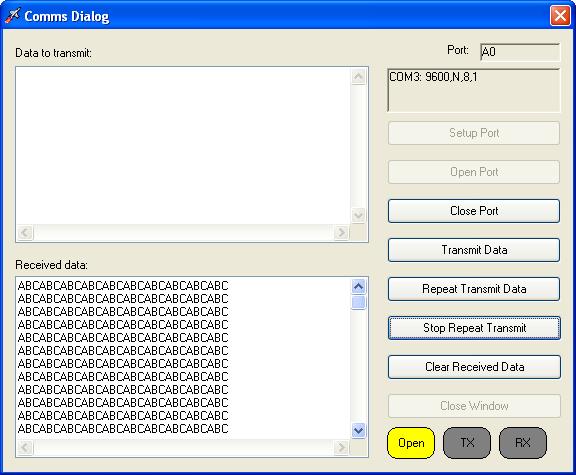
- The comms program defaults to COM1, 9600 baud, no parity, 8 data bits and 1 stop bit. Leave
these settings at the defaults unless you need to change the comms port (eg to COM3 needed by some
laptops).
- Open the ports on both computers. Type some text in the "Data to Transmit" area near the top
and click "Transmit Data". This sends the text over the serial cable to the second computer. The
second computer can send text back to the first computer in the same way.
- If you click "Repeat Transmit Data" this allows you to specify some text and a repeat interval.
This will repeatedly send text over the link.
- You can use the comms program with other serial devices such as microcontrollers, PLCs and test
equipment. Devices may have different serial connections, so check what kind of cable they need.
Generally the device will include its own cable.
- I am interested to know how you go with the comms program. If you have any questions or
suggestions please get in touch!
Developer Environment Improvements (30 April 2008)
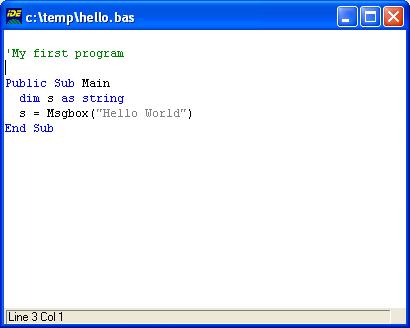
- Added syntax highlighting for Ubercode, Basic VBA and VBS, Batch files, RC files, T-SQL and
Inno Setup Scripts (ISS). Here's a picture of a standard Basic program being highlighted:
- Fixed a bug in the code that created the Learning To Program PDF file. The file previously had
some confusing text in it (macros that had not been expanded).
- Added a new Program - Add Dialog Window command to the Developer Environment. This makes
it possible to import individual dialogs from RC (Resource Compiler) files and helps re-engineer
older style C/C++ applications.
- If a pushbutton had the default status, and disabled itself and other pushbuttons in the same
dialog, the default status would sometimes be incorrectly applied to one of the other disabled
pushbuttons. What happened was the original pushbutton disabled itself, the default status was
correctly applied to the next usable pushbutton, but when this next button was disabled, the
default status was not then re-applied to another eligible button. This has now been fixed.
- Fixed a minor bug in the dialog handling code that caused static controls with the SS_SIMPLE
style to be incorrectly interpreted as icons. Note the bug was very unlikely to occur, as the
SS_SIMPLE style is obscure and seldom used.
- The Developer Environment command Tools-Test Dialog had a usability problem when testing
dialogs with off-screen X,Y coordinates. Although the Developer Environment was working properly,
it seemed to be non-responsive because the dialog was not visible. To fix this, the Tools-Test
Dialog command automatically centers any dialogs that are off the edge of the screen, and shows
a warning message.
- Fixed a minor bug that happened with external resource files that had icons using the old-style
memory options (PRELOAD, LOADONCALL, FIXED, MOVEABLE, DISCARDABLE, PURE, IMPURE). These memory
options are obsolete and are now ignored.
- Tidied up the names of some undocumented library functions (StrRemoveEol should be StrRtrimCrLf
etc). These functions will eventually be included in the library and the documentation.
Installer Improvements (26 March 2008)
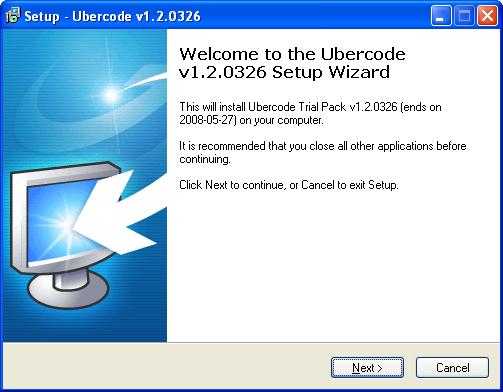
- I have redone the Ubercode Installer from the ground up using Inno Setup instead of
Installshield express. It now looks a whole lot better:
- Also it runs much faster - although I have not done an accurate benckmark, a full installation
on an average laptop takes 18 seconds. And that includes the time it takes to click the "Next"
button to skip through the dialogs!
- The Inno Setup installer has much better compression than Installshield, so the setup file is
32% smaller. In practical terms that means the latest download is 14MB
instead of 20MB. So don't delay, install the Trial Pack now - what are you waiting for!
- There is a safely feature that stops you uninstalling or re-installing while the program is
running. This is done with an appplication mutex (the AppMutex command in Inno Setup).
- The logic that handles installs and uninstalls of multiple versions is greatly improved and
covers these situations:
If you repeat the same installation of Ubercode, the installer always puts the repeat
installation in the same folder. This has several advantages - you can now repair an installation
by reinstalling it, the installations share a single Add/Remove program entry, and you can't
install the same version into different folders. This makes sure the uninstall does not leave
partial installations on the computer.
If you install different versions of Ubercode the installer makes sure the different
versions go into different folders and have different Add/Remove program entries. This makes sure
the uninstall of one version does not remove files belonging to another version, stopping it from
working. It also means you can test different versions on the same computer.
If you want to upgrade to a later version of Ubercode, you can uninstall the existing
version (leaving behind any files you created), then install the new version into the same
folder.
The net result of the installer improvements is that it saves time, looks better, and it's now
very quick to install and uninstall the Ubercode package.
- Other changes include...
- There was a bug in the debugger where if you specified CHM files as the preferred help type, it
would still try to display a HLP file. This has now been fixed.
- Removed ERR_LIST_EMPTY. This error is no longer required as there is no problem in deleting
from an empty list.
- Added extra context identifiers to the main help file allowing the CHM file to be called from
the command line. The context identifiers are in the same order as the topics are listed in the
project file starting from 1.
Compiler Improvements (8 February 2008)
- Fixed up LMAKE (command line tool) so it shows an error message if incorrect command line
parameters are used.
- Fixed a compiler bug that occurred if too many list types had the same component type and an
iterator function was used.
- Increased the default maximum number of symbols to 2500, and increased the number that may be
inherited from a compiled class to 1000. The compiler has also been changed so the maximum number
of symbols may be increased to 5000.
- There is a new download - this includes all the fixes above.
- I have also been experimenting with the Microsoft Dot Net framework with a view to eventually
producing a dot net code generator for Ubercode. As a first step I have prepared some sample
utility code which can be reached here.
|
|